Console Project - 숫자 야구 제작
※ 컴퓨터 숫자는 프로그래머가(본인이) 하나 지정해놓고 하셔도, 랜덤으로 하나 뽑은 후 자릿수 중복 체크 과정을 거치셔도 무방합니다.
- 컴퓨터는 임의의 세자리 숫자를 가지고 있음. 플레이어가 컴퓨터를 위한 중복되지 않는 임의의 세자리를 입력해주면 됩니다. (컴퓨터가 지 혼자 알고 있을 숫자 102~987) (개발자가 컴퓨터용 숫자를 심어놓는것이 아닌, Random 을 통해 임의의 세자리를 뽑게 해도 됩니다. 단 3자리 중복이 없는지 확인하는 로직이 있어야 합니다)
- 유저는 세자리 수를 입력하되 동일한 자리의 숫자가 있을 경우, 유저에게 다시 입력하라고 반복 시킴.
- 컴퓨터가 정한 수와, 유저가 입력한 숫자를 비교해서 만약 자릿수가 일치한 것이 있다면 스트라이크 수가 늘어남. 예를 들어, 컴퓨터의 수는 142고, 유저 입력은 172면 2스트라이크.
- 컴퓨터의 숫자와 유저가 입력한 숫자를 비교해서 숫자가 존재하긴 하나, 자릿수가 다를 경우, 볼 갯수가 증가. 예를 들어 172가 컴퓨터 숫자고, 127을 유저가 입력했다면 1스트라이크 2볼.
- 유저가 입력한 값 중 어느 하나도 컴퓨터의 숫자와 비교해서 같은 것이 없는 상황엔, 즉 볼과 스트라이크가 모두 없는 상황엔 ‘n스트라이크n볼’ 대신 ‘아웃’ 출력
- 3스트라이크 모두 나올때까지 유저는 계속 입력하게 되며, 유저의 입력 한번 당, 이닝이 하나씩 증가함
- 9이닝이 되기 전까지 3스트라이크를 내면 유저의 승, 11이닝이 될 때까지 3스트라이크가 나오지 않았다면 컴퓨터의 승리
이런 과제가 주어졌다.
어우.. 글이 길지만 하나씩 무엇이 필요한지 정리해보자.
1. 플레이어와 컴퓨터의 숫자를 저장할 변수 정의 - int, int[]
2. 랜덤한 세 자리 수를 생성해서 컴퓨터 변수에 넣기 - 102~987 사이의 중복 없는 세자리수
3. 플레이어 입력 - 숫자 조건은 컴퓨터와 동일
4. 스트라이크, 볼, 이닝 에 대한 변수
5. 컴퓨터와 플레이어의 숫자를 비교하고 점수 체크하는 기능
우선 이렇게 생각할 수 있겠다.
하나씩 만들어 보자
using System;

namespace ConsoleProject_NumberBaseball
{
    internal class Program
    {
        static void Main(string[] args)
        {
            bool isContinue = true;

            while (isContinue)
            {
            	Console.Clear();

				// 변수 정의 및 랜덤 수 출력
                Random rdn = new Random();
                int cpuNum = 0;
                int[] CpuNums = new int[3] { 0, 0, 0 };
                bool isCpuNumOk = false;

				// 컴퓨터가 정상적인 수를 입력할 때까지 입력 요구
                while (!isCpuNumOk)
                {
                    cpuNum = rdn.Next(102, 988);
                    // cpuNum을 각 자리 별로 나눠서 CpuNums[] 배열에 넣는 기능
                    // 이건 플레이어에서도 활용해야하니 따로 함수로 제작할 것

                    if (CpuNums[0] == CpuNums[1] || CpuNums[1] == CpuNums[2] || CpuNums[0] == CpuNums[2])
                    {
                        // Console.WriteLine($"cpu가 중복을 뽑아서 다시 실행 {Cpu}");
                    }
                    else
                    {
                        isCpuNumOk = true;
                    }
                }

				// 플레이어 인풋
                int playerNum;
                int[] playerNums = new int[3];


                // strike ball inning
                int strike = 0;
                int ball = 0;
                int inning = 1;

                bool isGameOn = true;


                // Game Update
                while (isGameOn)
                {
                    // Player 입력 요구
                    playerNum = RequestPlayerInput(playerNums);
                    Console.WriteLine("-----------------------------------------------------------------------");
                    Console.WriteLine($"플레이어가 입력한 숫자 : {playerNum}");
                    Console.WriteLine();
                    Console.Write($"{playerNums[0]} {playerNums[1]} {playerNums[2]}");
                    Console.WriteLine();
                    Console.WriteLine();

                    // 컴퓨터와 플레이어 숫자 비교 함수
                    // 결과 체크 함수
                }

                // 입력 요구 및 입력한 숫자 반환
                static int RequestPlayerInput(int[] playerNums)
                {
                    int playerNum;
                    while (true)
                    {
                        Console.WriteLine("102 ~ 987 사이의 정수를 입력하세요. (각 자리가 중복되지 않아야 합니다)");
                        if (int.TryParse(Console.ReadLine(), out playerNum))
                        {
                            if (playerNum > 101 && playerNum < 988)
                            {
                                // 플레이어 입력 수 각자리 분해해서 배열에 부여 함수

                                if (playerNums[0] == playerNums[1] || playerNums[1] == playerNums[2] || playerNums[0] == playerNums[2]) continue;
                                break;
                            }
                        }
                    }

                    return playerNum;
                }
            }
        }

    }
}
우선 기본적으로 게임의 전체 루프는 이렇게 구성했다.
플레이어 입력 요구하는 부분도 함수로 따로 빼놨다.
이제 주석으로 표시된 지점에 해당 기능을 구현하면 된다.
1. 3자리 숫자를 분해해서 배열에 각 자리수를 넣는 함수
2. 컴퓨터와 플레이어 숫자 비교 함수
3. 결과 체크 함수
1번부터 만들어 보자
// 숫자를 각 자리별로 분해해서 배열에 추가
static void DivideNumber(int num, int[] nums)
{
    int i = 2;
    while (num > 0)
    {
        nums[i] = num % 10;
        num /= 10;
        i--;
    }
}
작동 과정을 설명하자면
입력한 숫자에 %10을 해 1의 자리수를 nums[2]에 넣은 뒤 10으로 나누면 방식을 반복하면 각자리의 숫자를 분해할 수 있다.
배열 0, 1, 2 에 각각 100의 자리, 10의 자리, 1의 자리 수를 넣어야 하므로 i = 2 에서부터 i++ 를 하면서 진행시키는 함수다.
이거로 3자리 숫자를 자리 수대로 배열에 담을 수 있다.
i = 0 부터 해도 상관은 없다 방식의 차이다.
다음은 2번이다.
DivideNumber 함수를 통해 컴퓨터와 플레이어의 int 배열에 숫자가 들어갔을 테니 이걸 전달받아 비교하는 함수를 만들자.
// 숫자 비교 함수
static void CompareNumbers(int[] playerNums, int[] CpuNums, ref int strike, ref int ball)
{
    // 각 자리별 strike, ball 판단
    for (int i = 0; i < 3; i++)
    {
        if (playerNums[i] == CpuNums[i])
        {
            strike++;
        }

        for (int j = 0; j < 3; j++)
        {
            if (playerNums[i] != CpuNums[i] && playerNums[i] == CpuNums[j])
            {
                ball++;
            }
        }
    }
}
숫자를 비교해서 strike랑 ball 변수에 적용해주는 거까지가 이 함수의 역할이다.
다음은 3번
스트라이크, 볼, 이닝에 따라 다르게 콘솔을 출력하는 함수를 만들어주자
// 점수 체크
static void CheckScore(ref int inning, ref int strike, ref int ball, ref bool isGameOn)
{
    Console.WriteLine();
    Console.WriteLine($"{inning}이닝의 결과");

    if (strike == 0 && ball == 0)
    {
        Console.WriteLine($"아웃!!!");
    }
    else if (strike == 3 && inning < 9)
    {
        Console.ForegroundColor = ConsoleColor.Green;
        Console.WriteLine("3 스트라이크!! 9 이닝 전에 3 스트라이크를 달성했으므로 플레이어 승리!!");
        Console.ResetColor();
        isGameOn = false;
    }
    else if (strike == 3 && inning >= 9)
    {
        Console.ForegroundColor = ConsoleColor.Yellow;
        Console.WriteLine("3 스트라이크!! 9 이닝 이후 3 스트라이크를 달성했으므로 무승부!!");
        Console.ResetColor();
        isGameOn = false;
    }
    else if (strike != 3 && inning == 11)
    {
        Console.ForegroundColor = ConsoleColor.Red;
        Console.WriteLine("11 이닝까지 스트라이크를 달성하지 못했으므로 플레이어 패배!!");
        Console.ResetColor();
        isGameOn = false;
    }
    else
    {
        Console.WriteLine($"{strike} 스트라이크, {ball} 볼!!");
    }

    inning++;
    strike = 0;
    ball = 0;
    Console.WriteLine("-----------------------------------------------------------------------");
}
점수 체크가 끝나면 inning을 하나 늘려주고 스트라이크와 볼을 각각 0으로 초기화해주는 것 까지가 이 함수의 역할이다.
이걸 전체 코드로 적용하면
using System;

namespace ConsoleProject_NumberBaseball
{
    internal class Program
    {
        static void Main(string[] args)
        {
            bool isContinue = true;

            while (isContinue)
            {
                Console.Clear();

                Random rdn = new Random();
                int cpuNum = 0;
                int[] CpuNums = new int[3] { 0, 0, 0 };
                bool isCpuNumOk = false;

                while (!isCpuNumOk)
                {
                    cpuNum = rdn.Next(102, 988);
                    DivideNumber(cpuNum, CpuNums);

                    if (CpuNums[0] == CpuNums[1] || CpuNums[1] == CpuNums[2] || CpuNums[0] == CpuNums[2])
                    {
                        // Console.WriteLine($"cpu가 중복을 뽑아서 다시 실행 {Cpu}");
                    }
                    else
                    {
                        isCpuNumOk = true;
                    }
                }

                int playerNum;
                int[] playerNums = new int[3];


                // strike ball
                int strike = 0;
                int ball = 0;
                int inning = 1;

                bool isGameOn = true;


                // Game Update
                while (isGameOn)
                {
                    // Player 입력 요구
                    playerNum = RequestPlayerInput(playerNums);
                    Console.WriteLine("-----------------------------------------------------------------------");
                    Console.WriteLine($"플레이어가 입력한 숫자 : {playerNum}");
                    Console.WriteLine();
                    Console.Write($"{playerNums[0]} {playerNums[1]} {playerNums[2]}");
                    Console.WriteLine();
                    Console.WriteLine();

                    // 컴퓨터와 플레이어 숫자 비교
                    CompareNumbers(playerNums, CpuNums, ref strike, ref ball);
                    // 결과 체크
                    CheckScore(ref inning, ref strike, ref ball, ref isGameOn);
                }

                // 게임 계속 진행할지 여부
                Console.WriteLine();
                Console.WriteLine("One More Game? . . . Yes = AnyKey / No = N Key");

                ConsoleKeyInfo mKey;
                mKey = Console.ReadKey(true);

                // 다른 키 추가시 확장성을 고려해 스위치문 사용
                switch (mKey.Key)
                {
                    case ConsoleKey.N:
                        Console.WriteLine("종료");
                        isContinue = false;
                        break;
                }
            }
        }

        // 입력 요구 및 입력한 숫자 반환
        static int RequestPlayerInput(int[] playerNums)
        {
            int playerNum;
            while (true)
            {
                Console.WriteLine("102 ~ 987 사이의 정수를 입력하세요. (각 자리가 중복되지 않아야 합니다)");
                if (int.TryParse(Console.ReadLine(), out playerNum))
                {
                    if (playerNum > 101 && playerNum < 988)
                    {
                        DivideNumber(playerNum, playerNums);

                        if (playerNums[0] == playerNums[1] || playerNums[1] == playerNums[2] || playerNums[0] == playerNums[2]) continue;
                        break;
                    }
                }
            }

            return playerNum;
        }

        // 숫자 비교 함수
        static void CompareNumbers(int[] playerNums, int[] CpuNums, ref int strike, ref int ball)
        {
            // 각 자리별 strike, ball 판단
            for (int i = 0; i < 3; i++)
            {
                if (playerNums[i] == CpuNums[i])
                {
                    strike++;
                }

                for (int j = 0; j < 3; j++)
                {
                    if (playerNums[i] != CpuNums[i] && playerNums[i] == CpuNums[j])
                    {
                        ball++;
                    }
                }
            }
        }

        // 숫자를 각 자리별로 분해해서 배열에 추가
        static void DivideNumber(int num, int[] nums)
        {
            int i = 2;
            while (num > 0)
            {
                nums[i] = num % 10;
                num /= 10;
                i--;
            }
        }

        // 점수 체크
        static void CheckScore(ref int inning, ref int strike, ref int ball, ref bool isGameOn)
        {
            Console.WriteLine();
            Console.WriteLine($"{inning}이닝의 결과");

            if (strike == 0 && ball == 0)
            {
                Console.WriteLine($"아웃!!!");
            }
            else if (strike == 3 && inning < 9)
            {
                Console.ForegroundColor = ConsoleColor.Green;
                Console.WriteLine("3 스트라이크!! 9 이닝 전에 3 스트라이크를 달성했으므로 플레이어 승리!!");
                Console.ResetColor();
                isGameOn = false;
            }
            else if (strike == 3 && inning >= 9)
            {
                Console.ForegroundColor = ConsoleColor.Yellow;
                Console.WriteLine("3 스트라이크!! 9 이닝 이후 3 스트라이크를 달성했으므로 무승부!!");
                Console.ResetColor();
                isGameOn = false;
            }
            else if (strike != 3 && inning == 11)
            {
                Console.ForegroundColor = ConsoleColor.Red;
                Console.WriteLine("11 이닝까지 스트라이크를 달성하지 못했으므로 플레이어 패배!!");
                Console.ResetColor();
                isGameOn = false;
            }
            else
            {
                Console.WriteLine($"{strike} 스트라이크, {ball} 볼!!");
            }

            inning++;
            strike = 0;
            ball = 0;
            Console.WriteLine("-----------------------------------------------------------------------");
        }

    }
}
이렇게 완성된다.
추가로 마지막에 아무 키나 누르면 게임을 다시 시작하고, n 키를 누르면 종료되게까지 구성해서 진짜 게임처럼 만들어 봤다.
이제 직접 실행해서 플레이해보자.


바로 6이닝만에 승리해버렸다.
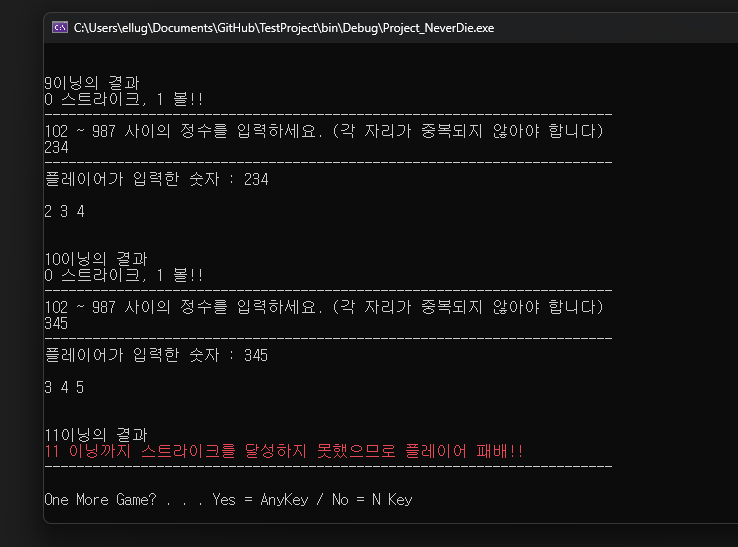
게임 재시작도 잘 되고 패배 조건도 잘 동작한다.
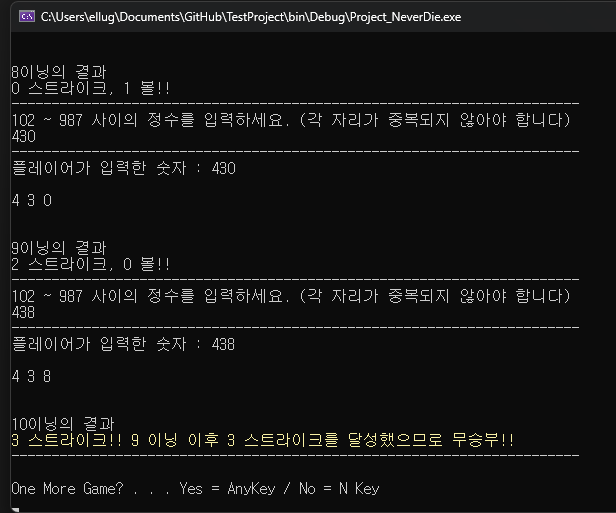
무승부도 잘 동작하고
N키를 입력하면 게임 종료되는 것까지 완벽하다.
'C#' 카테고리의 다른 글
| C# - 클래스(Class) & 객체지향 (1) | 2025.09.15 |
|---|---|
| 버전관리 : Git, GitHub, GitHub Desktop (0) | 2025.09.13 |
| C# - Window11 에서 Console.SetWindowSize 안 되는 문제 (0) | 2025.09.12 |
| C# - 구조체 (Struct, Structure) (0) | 2025.09.12 |
| C# - 열거형 (Enum, Enumeration) (0) | 2025.09.12 |